


CapEx budgeting

Import budgets, FX rates, and delegation of authority policies and assign them to business units and asset categories with mid-period revisions available.
Link requests to budgets or predefined projects.
Track actuals and monitor the remaining budget in the period.
Outline the expected phasing of capital expenditures across the financial year for accurate cash flow forecasting.
Compare investments over multiple-year periods.
Get notified if your capital expenditure request will result in overspending and budget overruns.
Dynamically adapt approvals based on remaining budget status.
Carry forward and re-assign the remaining budget into the next financial period.
Re-allocate budgets for emergency requests.
Handle various payment types, including CapEx/OpEx, write-downs, disposals, multi-year leases, acquisitions, new hires, and legal settlements.
Manage all budget types, e.g. budgeted, unbudgeted, overrun/variance, and reassignment (to another business unit/department, etc.)
Create special budgets for major capital projects, with their own tracking and current position information.
CapEx requests
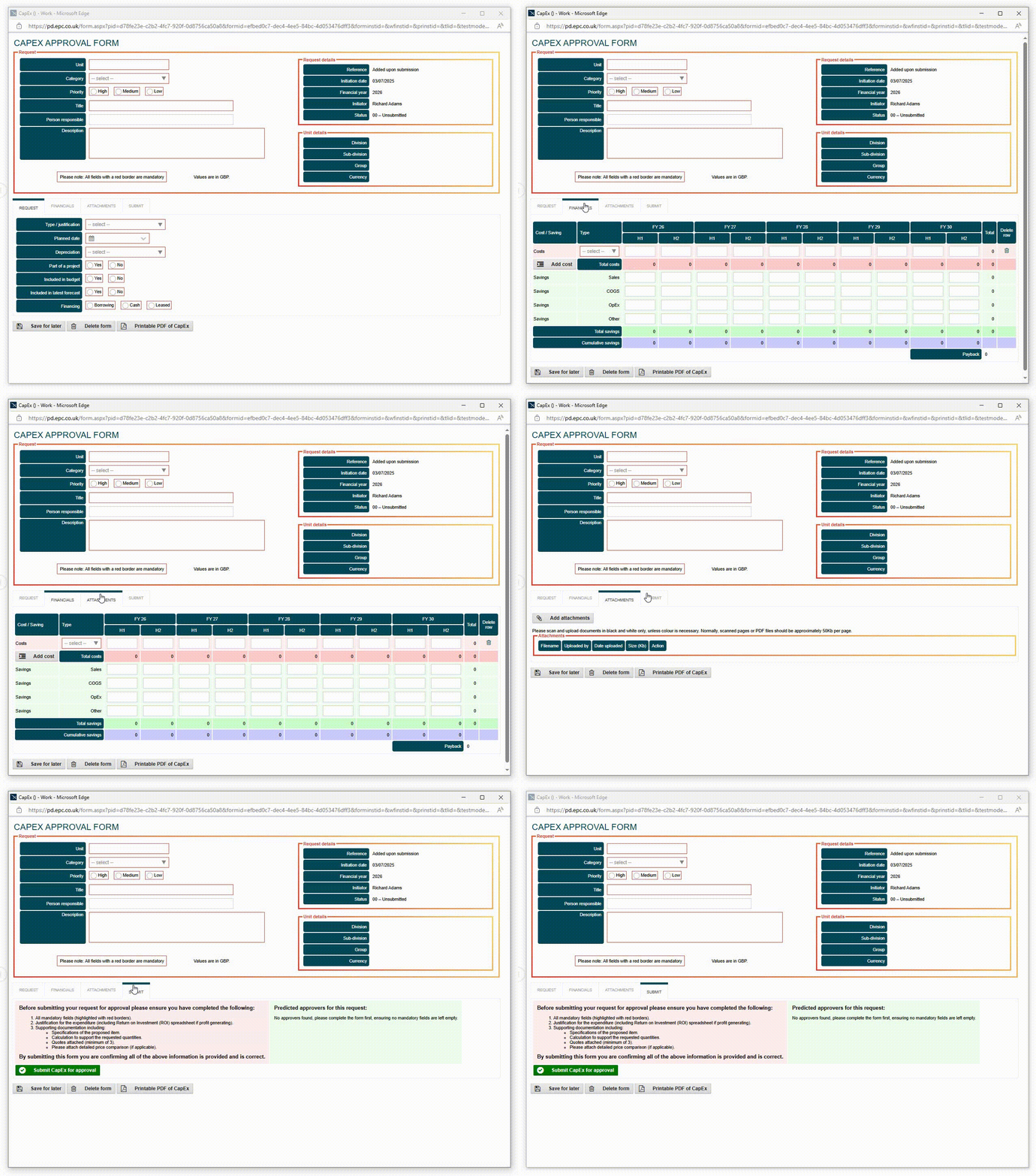
Standardised templates help eliminate incomplete submissions, manual rework, and approval delays caused by poor quality submissions, while enforcing consistent governance across the organisation.
Show/hide questions, lock fields, add skip logic, set mandatory/optional fields, and pre-populate fields, all based on conditional rules.
Highlight invalid fields and automatically validate data on input and/or submission.
Automated NPV, IRR, and payback calculations.
Show amounts in your local currency and global currency.
Automatic translation of capital expenditure approval forms and user interfaces into your users local languages for global user adoption.
Upload files in any format (xls, png, jpg, doc) to support the capital expenditure request.
Upload images and display them as thumbnails.
Generate printable PDFs of the submitted capital expenditure request form, including attachments.
Save a partially completed request as a draft and submit later when further information is available.
Lock forms to prevent unauthorised edits or modification
Add quotations from potential suppliers.
Add additional rows as necessary (e.g., mandatory for three quotes).
Escalate urgent/emergency requests via a modified workflow for prompt review and approval.
Display the current position, showing the total budget for period, budget used to date, and budget remaining.
Get instant alerts when requested amount exceeds the remaining budget.
Show the predicted approval steps for a CapEx request.
Add time-stamped comments to a request with Q&As and notes visible to executives later in the approval chain.
CapEx approvals

Ensure every investment request follows a consistent, auditable workflow across the organisation.
Add data integration steps to ingest data from other systems or export data to onward ERP, procurement, or purchasing systems.
Automatically enforce delegation of authority policies such as asset category, business unit, budgets, and authorisation limit to ensure every investment is properly evaluated and authorised.
Run CapEx approval steps sequentially when you need to receive one approval before another.
Unlike traditional linear workflows that chain steps together sequentially, parallel workflows enable users to work on requests simultaneously, vastly reducing the overall time to approval.
Enforce mandatory re-approval of projects at key decision gates – from initial concept to post-investment review.
This ensures the investment meets predefined criteria before moving to the next stage gate.
Automatically alert users to new tasks with reminders/escalations based on inactivity and due dates.
Meet deadlines by allowing users to delegate tasks to another user for a temporary period.
Approvers can refer to the audit trail associated with a capital expenditure submission when approving a request or reviewing the archives.
Approve, reject, or request clarification from anywhere via email or mobile app, allowing participants to quickly complete tasks when out of the office/offline.
Build configurable rules into your CapEx approval processes.
Some examples include allowing the administrator to cancel an approved request, thereby returning the budget.
Other scenarios include auto-cancelling clarification or rejection steps after two weeks, or purging rejected and unapproved requests over seven years old.
CapEx management and reporting

Web workspaces are customised to different user roles and serve as the primary interface to the system.
Authorised users can submit CapEx requests, view dashboards, search archived forms, and manage tasks.
Configure and combine task lists, tabular data, and chart/graph widgets to display real-time metrics, including project status, budget position, and cycle times.
Apply filters and drill down to display data for more in-depth insight.
Export data or schedule an automated report to be sent to colleagues at specific intervals.
Export data to pre-configured Excel templates for reporting and analysis or integrate with other line-of-business (LOB) or business intelligence (BI) applications.
Centralised control, security, and management of supporting documents, including justifications and risk assessments.
Collaborate with colleagues and simultaneously author/mark up documents, spreadsheets, and presentations.
Security, data protection and integration

Security
Support for role-based access control (RBAC), single sign-on (SSO), multi-factor authentication (MFA), and data encryption (in transit and at rest).
Audit trails
Full audit trail of all transactions and user activity to support compliance and regulatory reporting.
Integration
eCapEx supports direct integration, web services, and REST/SOAP calls to provide access to a wide variety of in-house and third-party services.
Its .NET-based Software Development Kit (SDK) enables near limitless capabilities to create reusable custom tasks and integrations.
Additionally, you can export data to flat file formats (e.g., CSV, Excel).
Deployment
Cloud, on-premises or hybrid deployment to fit your technology infrastructure.
eCapEx can be hosted in a UK data centre, which is compliant with UK GDPR requirements and ISO 27001 certified.
For organisations with global operations or specific data residency requirements, we can also host eCapEx within the Microsoft Azure global infrastructure, allowing you to select the appropriate region for your data.
All cloud hosted options include 99.95% uptime and ongoing technical support and maintenance, with system updates automatically rolled out to users.

Professional services
Our professional services team is here to make your implementation as smooth as possible.
While the platform is incredibly intuitive, some clients may not have the time or resources to build the solution themselves.
At ePC, we have a team of experts available to support you with demonstrations, requirements gathering, statement of work (SOW), development, externally accessible prototypes, system testing, user acceptance testing (UAT), and training/support/documentation.
Whether you prefer to build the system internally or require our professional services team to deliver a tailored solution, we have an option to suit.
Case studies


Rentokil Initial plc is a global leader in Pest Control and Hygiene & Wellbeing services. It employs over 60,000 people in around 90 countries.
Historically, the business operated a decentralised model with each country managing local processes for capital expenditure approval, mainly on paper forms. At the divisional level, there was a desire for a cloud-hosted solution to provide greater visibility, automate processes, and track forecasts and cash flow.
Using eCapEx, they were able to automate their CapEx process across all European, APAC, Latin America, and US operations.


Millennium Hotels and Resorts is a global hospitality brand with a diverse collection of hotels across four continents and 80 destinations.
Using eCapEx, Millennium Hotels and Resorts automated a complex CapEx approval workflow involving up to 28 approval steps across its international portfolio of 100+ hotels.
The success of the initial implementation led to additional process automation projects across the organisation.

Read real eCapEx reviews from G2, the world’s largest and most trusted data source for B2B software.

“What I like best about eCapEx is how it streamlines the capital expenditure approval process, making planning, approvals, and tracking much more efficient and transparent.”
“eCapEx improves visibility [of] approvals, budgets, and spending, reducing the need for manual tracking and follow-ups.”
Verified User in Consumer Services
Mid-Market (51-1000 emp.)

“I like it because this tool is simple, intuitive and flexible.”
Alex V.
Financial analyst
Enterprise (> 1000 employees)
Already a customer? Write a review on G2.


